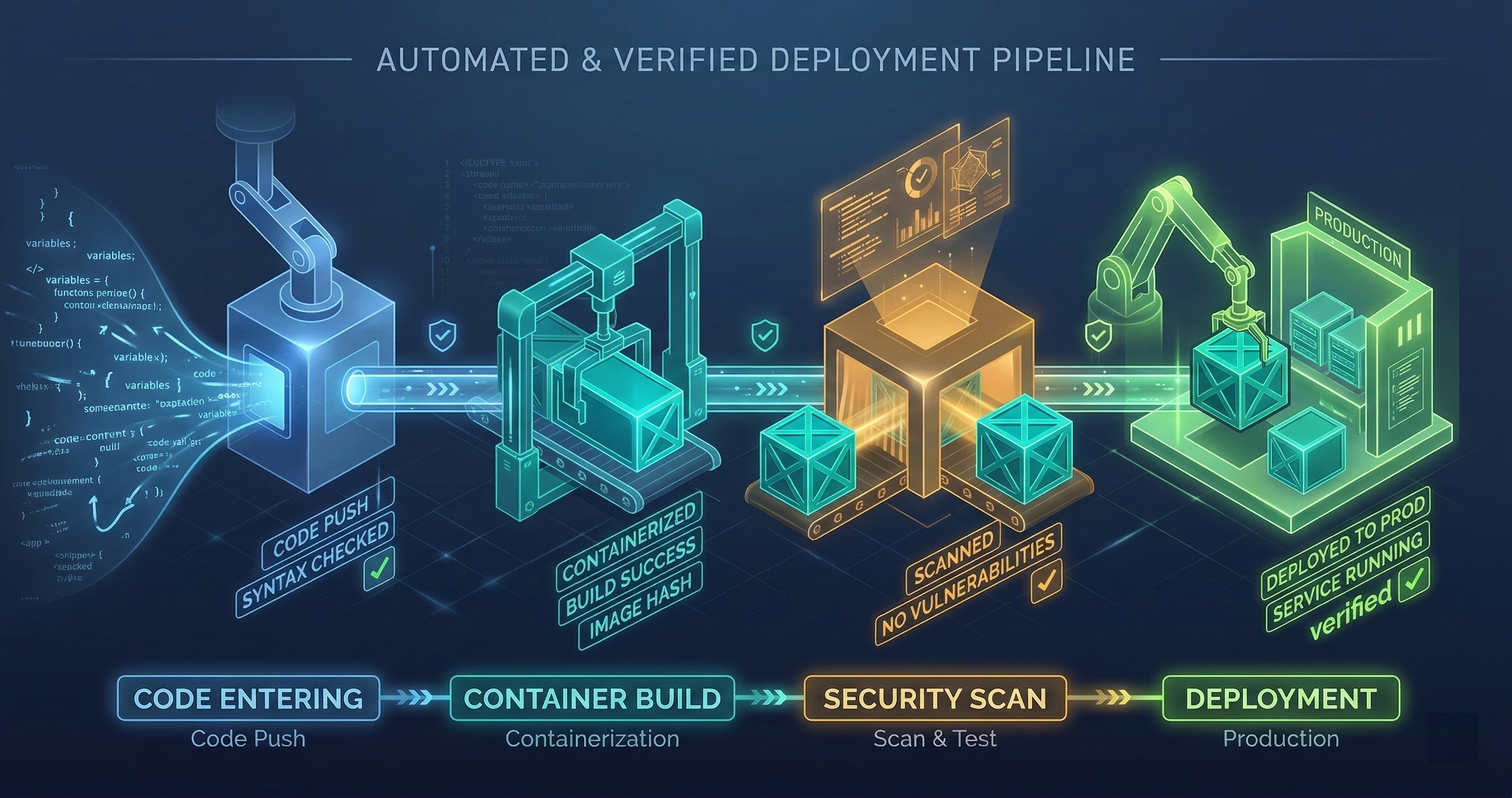
GitHub + Docker + Railway: The Deployment Pipeline
From git push to production in under 5 minutes. GitHub Actions builds the container, Trivy scans it, Docker Hub stores it, Railway deploys it. No manual steps.
From git push to production in under 5 minutes. GitHub Actions builds the container, Trivy scans it, Docker Hub stores it, Railway deploys it. No manual steps.
I run 14 production services. Before this pipeline existed, deploying meant SSH-ing into a server, pulling the latest code, building manually, restarting services, and checking logs to see if anything broke. Each deployment took 15-20 minutes of focused attention. With 14 services, a full deployment day consumed 4+ hours.
Now it takes one command: git push. Everything after that is automated.
The Pipeline in Four Stages
Stage 1: GitHub Actions Build
The workflow triggers on push to main. It checks out the code, sets up the build environment, and runs the test suite. If any test fails, the pipeline stops. No exceptions.
The build runs in a GitHub-hosted runner with a fixed Ubuntu version. I learned the hard way that floating runner versions cause nondeterministic failures — a test that passes on Ubuntu 22.04 might fail on 24.04 because a system library changed behavior. Pinning the runner version eliminates this class of ghost failure.
Build caching is critical for speed. Docker layer caching means unchanged layers aren’t rebuilt. A typical code change only affects the application layer, not the base image or dependency layers. This drops build time from 8 minutes to under 2 minutes for most pushes.
Stage 2: Trivy Security Scan
After the Docker image builds, Trivy scans it for known vulnerabilities. It checks the base image, installed packages, application dependencies, and configuration files.
The scan runs with a severity threshold: CRITICAL and HIGH vulnerabilities fail the pipeline. MEDIUM and LOW get reported but don’t block deployment. This is a pragmatic choice — blocking on every MEDIUM vulnerability would mean nothing ships, because base images always have a backlog of MEDIUM-severity findings that take weeks or months to get patched upstream.
When Trivy finds a critical vulnerability, the pipeline posts the finding to a GitHub issue tagged security. The issue includes the CVE number, affected package, available fix version, and the Dockerfile line that introduced it. This makes remediation a 5-minute fix (update the package version) instead of a 30-minute investigation (figure out what’s vulnerable and why).
I’ve caught 3 critical vulnerabilities through Trivy that would have been in production without this gate. One was a known remote code execution in a transitive dependency of a Python package. The dependency was four levels deep — no human reviewer would have found it.
Stage 3: Docker Hub Push
The scanned image gets tagged and pushed to Docker Hub. Tags follow a convention: latest for the most recent build, plus a tag matching the git commit SHA for traceability.
The SHA tag is essential for rollbacks. If a deployment breaks production, I can point Railway at the previous SHA tag and redeploy in under a minute. Without SHA tagging, a rollback means reverting the git commit, rebuilding, rescanning, and redeploying — a 10-minute process that feels like an hour when production is down.
Docker Hub credentials are stored in GitHub’s encrypted secrets. They’re never in code, never in environment files, never in logs. The GitHub Actions workflow accesses them through the ${{ secrets.DOCKER_TOKEN }} syntax, which redacts the value from all log output.
Stage 4: Railway Auto-Deployment
Railway watches the Docker Hub repository. When a new image appears with the latest tag, Railway pulls it and deploys it. The deployment follows a rolling update strategy — the new container starts, passes a health check, and then the old container is drained and terminated.
The health check is a critical detail. Railway sends a GET request to a /health endpoint. The endpoint checks database connectivity, external API reachability, and disk space. If any check fails, the health endpoint returns 503, Railway aborts the deployment, and the old container keeps running.
I’ve seen deployments fail at the health check 4 times. Each time, the failure was legitimate — a database migration hadn’t run, an API key had expired, a volume mount was misconfigured. The health check prevented a broken deployment from reaching users.
Multi-Stage Docker Builds
Every Dockerfile uses multi-stage builds. The build stage installs all development dependencies, compiles the application, and runs tests. The production stage copies only the compiled output and runtime dependencies.
This matters for two reasons. First, the production image is smaller — typically 150-300MB instead of 800MB+. Smaller images deploy faster and have a smaller attack surface. Second, development dependencies (compilers, test frameworks, linters) never exist in the production image. You can’t exploit a vulnerability in a package that isn’t installed.
A typical multi-stage Dockerfile:
# Build stage
FROM node:20-alpine AS builder
WORKDIR /app
COPY package*.json ./
RUN npm ci
COPY . .
RUN npm run build
RUN npm run test

# Production stage
FROM node:20-alpine
WORKDIR /app
COPY --from=builder /app/dist ./dist
COPY --from=builder /app/node_modules ./node_modules
COPY --from=builder /app/package.json ./
USER node
CMD ["node", "dist/index.js"]
The USER node line matters. Running as root inside a container is a common mistake. If an attacker gets code execution inside the container, running as root means they own the container. Running as a non-root user limits the blast radius.
Health Checks and Restart Policies
The health check endpoint does more than return 200 OK. It runs a battery of checks:
Database connectivity: Opens a connection, runs a trivial query (SELECT 1), and verifies the response. If the database is unreachable, the service is unhealthy. This catches connection pool exhaustion, credential rotation failures, and network partition scenarios.
External API reachability: For services that depend on external APIs (LLM providers, payment processors), the health check verifies that those APIs respond within acceptable latency. A service that can’t reach its LLM provider is functionally broken even if the service itself is healthy.
Disk space: For services with persistent volumes, the health check verifies available disk space exceeds a minimum threshold. A service that’s 95% disk-full is about to fail, and it’s better to flag it now than to discover it when writes start failing.
Memory pressure: Checks that the container’s memory usage is below 90% of its limit. Above 90%, the OOM killer is one spike away from terminating the process.
The restart policy is on-failure with a maximum of 3 restarts. If a container fails 3 times in a row, it stays down and alerts fire. Unlimited restarts hide problems — a container crash-looping 200 times per hour generates noise in logs, burns CPU on the host, and never actually recovers. Three restarts is enough to handle transient failures (temporary network blips) without masking persistent ones (bad configuration, corrupted state).
Gotchas I’ve Hit
Volume mounts shadow baked-in files. If your Dockerfile copies a config file to /data/config.json and your deployment mounts a volume at /data, the volume mount shadows the baked-in file. The config is gone. This cost me 2 hours of debugging the first time it happened. Now all config files live outside volume mount paths.
Railway’s startCommand can override Docker ENTRYPOINT. If you set both ENTRYPOINT in the Dockerfile and startCommand in Railway, the startCommand may replace the ENTRYPOINT entirely, not supplement it. I use CMD-only Dockerfiles now and set the startCommand in Railway when needed. No ENTRYPOINT.
railway up respects .gitignore. If a file is in .gitignore but is tracked by git, railway up excludes it. Lock files are the common victim. If your build depends on pnpm-lock.yaml and it’s in .gitignore, the Railway build will install different dependency versions than your local build. The fix is to temporarily remove the lock file from .gitignore before railway up.
Volume permissions on non-root containers. Railway volumes mount as root:root. If your container runs as a non-root user (node, app, www-data), it can’t write to the volume. The fix is a custom entrypoint that runs as root, chowns the volume directory, then drops to the application user. This is ugly but necessary.
MSYS path conversion on Windows. Git Bash on Windows converts Unix paths in command arguments. railway environment edit --config /app/config.json becomes railway environment edit --config C:/Program Files/Git/app/config.json. Setting MSYS_NO_PATHCONV=1 before the command disables this conversion.
The Full Flow
- I push a commit to
main. - GitHub Actions checks out the code (15 seconds).
- Docker builds the image with layer caching (1-2 minutes).
- Tests run inside the build stage (30-60 seconds).
- Trivy scans the image for vulnerabilities (30 seconds).
- The image pushes to Docker Hub with SHA and
latesttags (20 seconds). - Railway detects the new
latesttag and pulls the image (15 seconds). - Railway starts the new container and runs the health check (10 seconds).
- Health check passes, old container drains, new container takes traffic.
Total: 3-5 minutes from push to production.
If any step fails, everything after it doesn’t run. There’s no “deploy anyway” button. There’s no “skip tests this once” flag. The pipeline is a gate, not a suggestion.
In 14 production services running this pipeline for 6 months, I’ve had zero incidents caused by the deployment process. Every production incident has been an application bug — the kind that tests should have caught, not the kind that deployments introduce. The pipeline has earned the right to run unattended.
Setting up deployment pipelines for your services? I help teams build CI/CD systems that are fast, secure, and require zero manual intervention. Book a call to discuss your deployment architecture.